

Note: This article covers PDF configuration for use with Top Producer CRM real estate software.
Top Producer CRM relies upon a PDF Viewer on your computer or browser to output printed materials such as letters, labels, and envelopes to a print device. As such, it is important to make sure that the print settings are properly configured for best results when printing. Issues that may arise from incorrect configuration include incorrect fonts and a variety of spacing and margin issues.
When you click the Print icon after viewing a print preview of a mailing activity (such as a letter, label, or envelope), you will be presented with print options similar to the examples below. The print options and correct settings will vary depending on the internet browser you are using. Click the appropriate link below for instructions that apply to your browser:
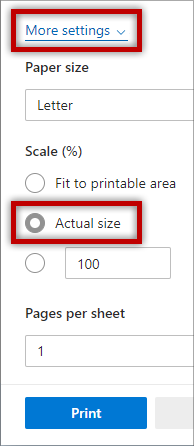
Microsoft EdgeEnsure that Scale (%) is set to Actual Size.
Chrome version 74 and later:

Ensure that Scale is set to Default.
Earlier Chrome versions:

Ensure that the Fit to page checkbox is Unchecked.
Mozilla Firefox may by default be using the incorrect PDF plugin. If your document preview shows a toolbar similar to the below, follow these instructions:

- At the top of the browser, click the menu button
 and choose Options.
 - In the General panel, go down to the Applications section.
- Find Portable Document Format (PDF) in the list and click to select it.
-
Click on the drop-down arrow in the Action column and select Use Adobe Reader (default).

-
Close the about:preferences page. Your changes have been automatically saved.
Once the correct PDF plugin is set, load the print preview of your document and use the below settings to ensure your document prints correctly:

The following settings (indicated by the highlighted box in the image above) need to be configured:
- Size Options should be set to Actual Size.
- Choose Paper Source by PDF Page Size should be checked.
- Orientation should be set to Auto portrait/landscape.
These settings will be retained from one mailing to the next, but make sure that they are properly configured in each mailing to ensure best results.
The following settings (indicated by the highlighted box in the image above) need to be configured:
- Size Options should be set to Actual Size.
- Choose Paper Source by PDF Page Size should be checked.
- Orientation should be set to Auto portrait/landscape.
These settings will be retained from one mailing to the next, but make sure that they are properly configured in each mailing to ensure best results.

The following settings (indicated by the highlighted box in the image above) need to be configured:
- Page Scaling should be set to None.
- Auto Rotate and Center should be unchecked.
- Choose Paper Source by PDF Page Size should be checked.